Whalor vs Unusual Whales
Unusual Whales is a broad options data platform for researching flow across the whole market. Whalor focuses on same-day setups: it sends a specific contract with an entry, reason, and targets, then tracks how the setup resolved. The better fit depends on whether you want raw data to research or a prepared plan to review.
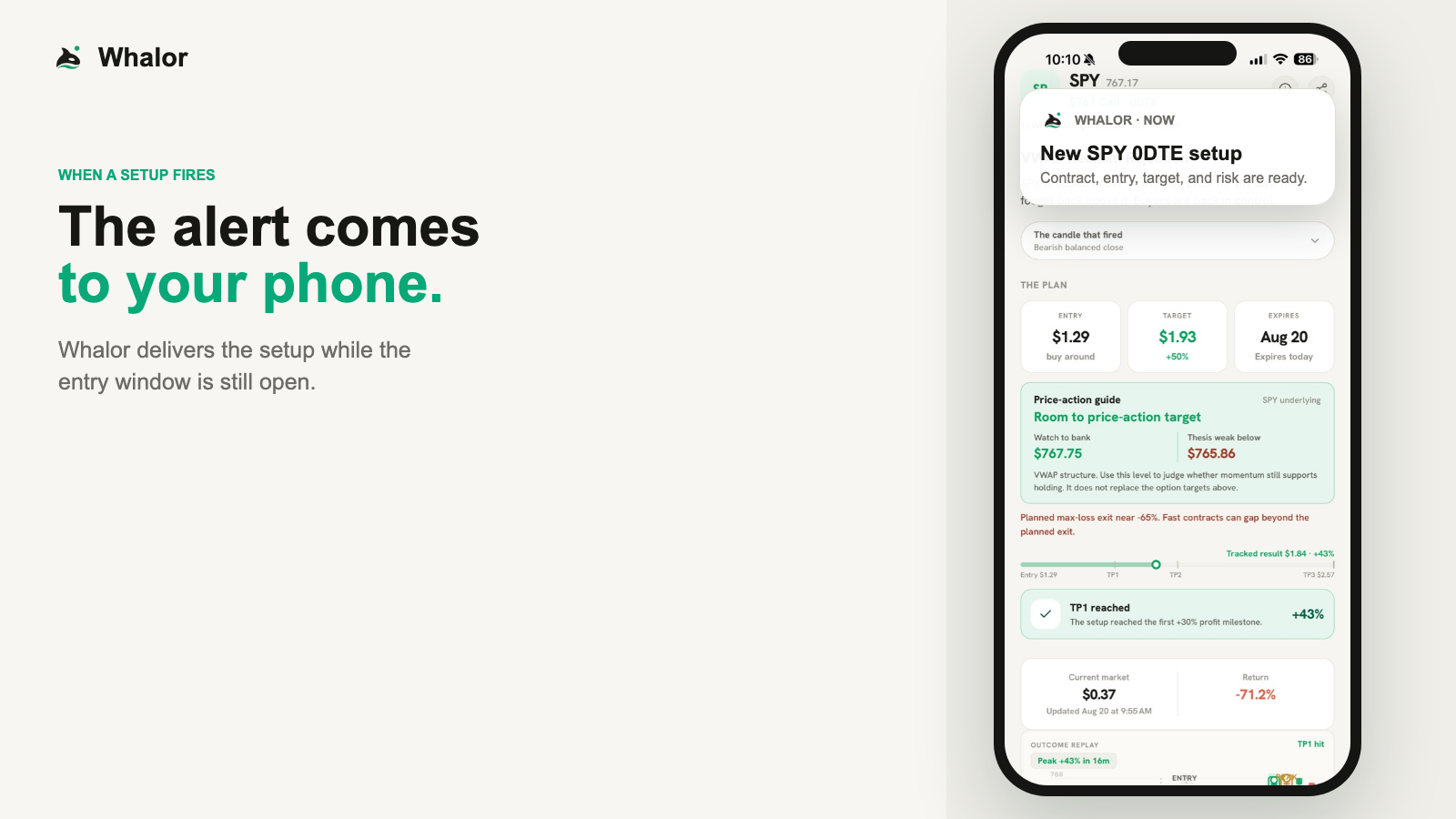
What the walkthrough shows
You have a job. You can't watch the market all day. When Whalor finds a setup, the complete alert comes straight to your phone. Tap it to see the exact contract, why it fired, and the full trade plan. That includes the entry, target, planned exit, and the price-action level to watch. As the trade moves, you get alerts at take-profit levels one, two, and three. If the trade keeps running, Whalor alerts you again at one hundred, two hundred, and three hundred percent. Then the result goes on the calendar, whether it wins or loses. Review the setup. Make your decision.
The short answer
Unusual Whales is likely the better fit if
- You want to study options flow across the whole market and form your own trade ideas.
- You use filters, screeners, charting, and custom alerts, and you enjoy the research.
- You trade more than same-day contracts, or more than a handful of tickers.
- You want web, iOS, and Android access to the same account.
Whalor is likely the better fit if
- You trade, or want to learn to trade, same-day options on liquid index ETFs.
- You would rather receive a finished setup than build one from raw data.
- You want each alert tracked to a result, losing ones included, so you can judge the method.
- You check your phone during the session rather than sitting at a terminal.
Whalor and Unusual Whales at a glance
A summary of how the two products approach the same trader. Unusual Whales details come from its own public pages, cited below each section.
Primary job
- Whalor
- Sends a small number of prepared 0DTE setups and tracks how each one resolves.
- Unusual Whales
- A market data and research platform: real-time options flow, charting, screeners, alerts, and news in one place.
What an alert is
- Whalor
- A prepared setup: ticker, call or put, strike, same-day expiration, reference entry, the reason it fired, and profit targets.
- Unusual Whales
- Alerts on conditions you define, such as saved flow filters, delivered on the website, in the mobile app, and by push.
Market coverage
- Whalor
- SPY, QQQ, IWM, and selected liquid tickers. Only contracts that expire the same session.
- Unusual Whales
- Options trades across all US options exchanges, on paid plans in real time.
Work left to you
- Whalor
- Decide whether the setup suits you, then place and manage any trade yourself.
- Unusual Whales
- Choose filters, read the prints, and turn what you see into a trade idea and a plan.
After the alert
- Whalor
- Notifications as the contract reaches each target, then the tracked result on the calendar once the setup resolves, losses included.
- Unusual Whales
- Saved trades and contracts, flow charting, and an options profit calculator for planning your own trades.
Devices
- Whalor
- iPhone app. The website shows public history and product information.
- Unusual Whales
- Website plus iOS and Android apps. Its documentation suggests desktop for the fullest flow view.
Pricing approach
- Whalor
- Free plan for resolved setup history and replays. Premium is $99 a month for live alerts, started from the iPhone app.
- Unusual Whales
- A free tier with delayed data, and several paid retail tiers billed monthly or annually.
Sources: Unusual Whales: Features (opens in a new tab), Unusual Whales: Plans & Pricing (opens in a new tab), Unusual Whales Docs: Options Flow (opens in a new tab).
How the workflows differ
Where Unusual Whales fits
Unusual Whales is built for people who want the raw material. Its options flow feed records trades from every US options exchange, and you shape it with filters, sorting, saved views, and custom alerts. Around the feed sit charting, screeners, an options profit calculator, news, and other market data.
That breadth is the point, and it asks something of you. The platform shows what traded; deciding what it means, which contract to use, where to enter, and when to leave is your job. Traders who like that research loop get a lot of surface to work with.
Sources: Unusual Whales: Features (opens in a new tab), Unusual Whales Docs: Options Flow (opens in a new tab), Unusual Whales: Plans & Pricing (opens in a new tab).
Where Whalor fits
Whalor does the narrowing before you see anything. It watches a small set of liquid tickers during the session and alerts only when one of its price-action strategies produces a same-day setup. The alert names the exact contract, a reference entry, the reason it fired, and the targets.
After that, Whalor keeps score. You get a notification as the contract reaches each target, and once the setup resolves its tracked outcome goes on the calendar, losses included. Strategy statistics and outcome replays let you review how each approach has behaved. What Whalor does not give you is a view of the wider market, so it is not built for evaluating a trade idea you found in the flow yourself.
Using both
They are not mutually exclusive. A trader might use a flow platform for market context and still want a separate, graded list of specific same-day setups. If you do that, treat them as independent inputs. Whalor does not measure whether its setups agree with flow on any other platform, so agreement between the two is not a tested signal.
Where Whalor falls short
If any of these matter to you, weigh them before choosing Whalor over Unusual Whales.
- No market-wide flow feed, screener, or charting workspace. If that is what you need, Whalor is the wrong tool.
- Only same-day expirations on a limited ticker list. Some sessions produce no setups at all.
- Built for iPhone. There is no desktop terminal.
- The reference entry is a guide, not a fill. Your price and result will differ from the tracked outcome.
- Whalor does not place, manage, or close trades, and target notifications are not take-profit orders.
Pricing
Whalor
Whalor has a free plan with resolved setup history and outcome replays. Premium is $99 a month and adds live setup alerts and target notifications. New subscriptions start from the Whalor iPhone app.
Unusual Whales
Unusual Whales lists a free tier that shows data on a delay, and paid retail tiers that differ mainly in alert, watchlist, and dashboard limits. Plans can be billed monthly or annually. Check its pricing page for current rates, and note that its API is sold separately.
Common questions
Is Whalor an Unusual Whales alternative?
Only for part of what Unusual Whales does. If you use it mainly to find same-day trade ideas on SPY, QQQ, or IWM, Whalor offers a more finished version of that single job. If you use it for market-wide flow, screeners, charting, or research, Whalor does not replace any of that.
Does Unusual Whales have a mobile app?
Yes. Unusual Whales lists iOS and Android apps alongside its website. Its documentation notes that the full flow view works best on desktop.
Does Whalor show options flow?
No. Whalor alerts are same-day setups built from price action on the underlying ticker, with the contract and plan attached. It does not publish a trade-by-trade options feed.
Did Whalor test Unusual Whales for this comparison?
No. This comparison is based on Unusual Whales' public feature, documentation, and pricing pages, read on the date shown. It compares how the products work, not trading results.
About this comparison
Whalor wrote this page, so read it as a vendor's comparison, not an independent review. We have not tested Unusual Whales's paid plans. Everything said about Unusual Whales comes from its public pages, listed below and read on September 24, 2026. Features and prices change; check the sources for current details.
Spotted something out of date or wrong? Tell us through support and we will correct it.
Sources
See how a Whalor setup works
Start with the free plan to review resolved setups and their outcomes before deciding on live alerts.