0DTE options alerts
A 0DTE option expires at the end of the trading day it is bought. Whalor sends 0DTE options alerts to your iPhone while a setup is still live, with the exact contract, a reference entry, the reason it fired, and profit targets, then tracks how each setup resolved.
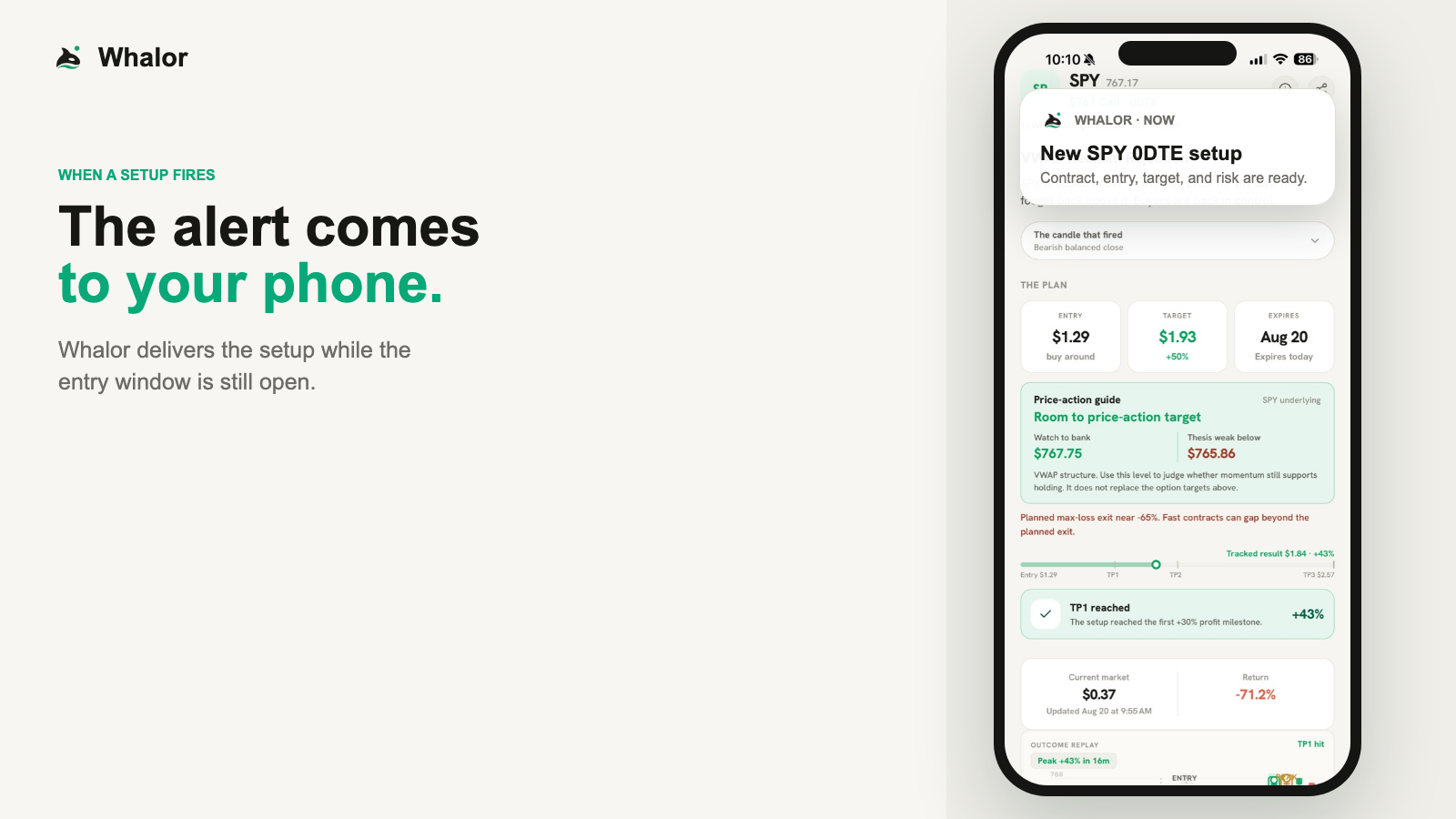
What the walkthrough shows
You have a job. You can't watch the market all day. When Whalor finds a setup, the complete alert comes straight to your phone. Tap it to see the exact contract, why it fired, and the full trade plan. That includes the entry, target, planned exit, and the price-action level to watch. As the trade moves, you get alerts at take-profit levels one, two, and three. If the trade keeps running, Whalor alerts you again at one hundred, two hundred, and three hundred percent. Then the result goes on the calendar, whether it wins or loses. Review the setup. Make your decision.
What a 0DTE options alert is
Options expire on a schedule. A 0DTE, or zero days to expiration, option is one bought on the day it expires, so the whole trade plays out within a single session. Major index ETFs such as SPY and QQQ list expirations every trading day, which is why same-day trading concentrates on them.
With only hours left, a same-day contract has little time value and reacts sharply to moves in the underlying. That cuts both ways: a small move in your favor can produce a large percentage gain, and a small move against you, or no move at all, can take the contract toward zero before the close.
An alert service tries to do the watching for you. Whalor's version watches a short list of liquid tickers during the session and sends an alert only when one of its price-action strategies qualifies, then names the specific contract instead of just the ticker and direction.
What arrives in a Whalor alert
Premium alerts arrive as a push notification and open to the full setup. Each one includes:
Ticker and direction
The underlying, such as SPY, and whether the setup is a call or a put.
Exact contract
The strike and the expiration, which is always the same session.
Reference entry
A buy-around price for the contract at alert time. It is a guide, not a quote you are guaranteed.
Why it fired
The strategy and the price action behind it, written out in words.
Profit targets
Three milestones, TP1 to TP3, measured from the reference entry.
Planned exit and level
The loss level the setup is judged by, and a price level on the underlying to watch.
Target notifications
A push notification each time the contract reaches a target, plus runner updates beyond TP3.
Tracked outcome
When the setup resolves, for example at its target, a profit milestone, or its planned exit, the result goes on the calendar with a replay of the stock candles.
How to read a setup
The example below is illustrative. It is not a real alert, a historical result, or a suggestion to buy this contract.
Illustrative example · not a real alert
SPY $600 Call
Expires today
- Reference entry (buy around)
- $1.00
- TP1
- $1.30+30%
- TP2
- $1.50+50%
- TP3
- $2.00+100%
Why it fired: Opening-range breakout, holding above VWAP
Check the contract, not just the ticker
Confirm the strike, the side, and that the expiration is today. A different strike or a later expiration is a different trade with different risk.
Compare the live price with the reference entry
Same-day contracts move in seconds. If the price has already run well past the reference entry, the plan no longer describes the trade in front of you.
Read why it fired
The reason tells you what has to keep happening for the setup to stay valid, such as price holding a level. If that stops being true, the setup has weakened regardless of the targets.
Decide your size and exit before you enter
Whalor does not know your account. Size every same-day position as money you could lose in full, and decide in advance how you will leave.
Place and manage the trade yourself
Whalor does not place, close, or protect trades. A target notification tells you a level was reached; it does not sell anything for you.
Tracked outcomes are not your returns
Whalor tracks each setup until it resolves and keeps the losing ones on the calendar. That record is useful for judging the method, but it measures the setup, not your trade.
The reference entry is not your fill
Tracked outcomes start from the reference entry. You will usually buy at a slightly different price, and in a fast market the difference can be large.
A target reached is not a target sold
When the contract touches TP1, the setup is marked as reaching TP1. Whether you made that gain depends on whether you sold there, and prices can fall back quickly.
Milestones and exits measure different things
A setup can reach a profit milestone and still end as a loss for someone who held on. Read the peak, the targets reached, and the final result as separate facts.
The record is modeled, not an account statement
Calendar results model one contract per setup at the reference prices. They are not anyone's brokerage results and do not include your commissions, fees, or slippage.
Tickers, expirations, and how often alerts come
- Whalor covers SPY, QQQ, IWM, and a small set of other liquid tickers. It does not scan the whole market.
- Alerts are for contracts that expire the same session. Single stocks do not all list an expiration every day, so a ticker can be in scope and still have no same-day contract on a given date.
- Setups appear only when a strategy qualifies. Some sessions produce several, some produce none, and there is no fixed number per day.
Who 0DTE alerts suit, and who they do not
Whalor may suit you if
- You already understand how options work and want a focused list of same-day setups.
- You can check your phone during market hours and act, or skip, within minutes.
- You want to judge an alert method by its tracked record, losses included.
- You treat every same-day position as money you can afford to lose.
Whalor is not for you if
- You are new to options and have not traded contracts before.
- You need income from trading or cannot afford to lose what you put in.
- You want a service to place, manage, or close trades for you.
- You want market-wide scanning, longer-dated contracts, or advice about your own portfolio.
The risks of same-day options
You can lose the entire premium
A same-day option that finishes out of the money expires worthless. Many do.
Prices change fast
With hours to expiration, a contract can lose half its value in minutes. It can also move past a planned exit before you can act.
Spreads and fills cost you
The gap between bid and ask, and the price you actually get, can erase a small gain. Liquid tickers narrow this; they do not remove it.
Time decay works against buyers
As the session runs down, time decay can erode a same-day contract's value quickly when the underlying does not move enough. Implied volatility and prices vary, so the effect is not uniform.
Pricing
The free plan shows resolved setups, outcomes, and replays, so you can study the record first. Premium is $99 a month and adds live setup alerts and target notifications. New subscriptions start in the Whalor iPhone app.
Common questions
What does the free plan include?
The free plan shows resolved setups, their outcomes, and replays of the stock candles, so you can review the record before paying. Live alerts and target notifications need Premium.
How much is Premium, and where do I subscribe?
Premium is $99 a month. New subscriptions start in the Whalor iPhone app. You can manage or cancel Premium anytime from your account's billing options.
Which tickers does Whalor cover?
SPY, QQQ, IWM, and a small set of other liquid tickers. Coverage is intentionally narrow, and a ticker only gets an alert on days it has a same-day contract and a setup qualifies.
How many alerts will I get?
It varies. Whalor alerts only when a setup qualifies, so some days have several and some have none. There is no daily quota.
Does Whalor place trades or set take-profit orders?
No. You decide whether to trade and you place and manage the order with your own broker. Target notifications are messages, not orders, and the planned exit is not a stop order.
Do I need a brokerage account to use Whalor?
No. You can read every alert and review the record without one. To act on a setup you need an options-approved account with a broker of your choice.
Is Whalor financial advice?
No. Whalor is research and alert software. It does not know your finances, and no alert is a recommendation that you personally buy or sell anything.
Review the record, then decide
Download Whalor free to read resolved setups and their outcomes. Upgrade only if live alerts fit how you trade.